Translate Audio settings: recognition, translation and voiceover
What each option in Translate Audio settings does, what it costs and when it applies: speech recognition, translation model, standard and cloned voices.
Updated November 2, 20265 min read
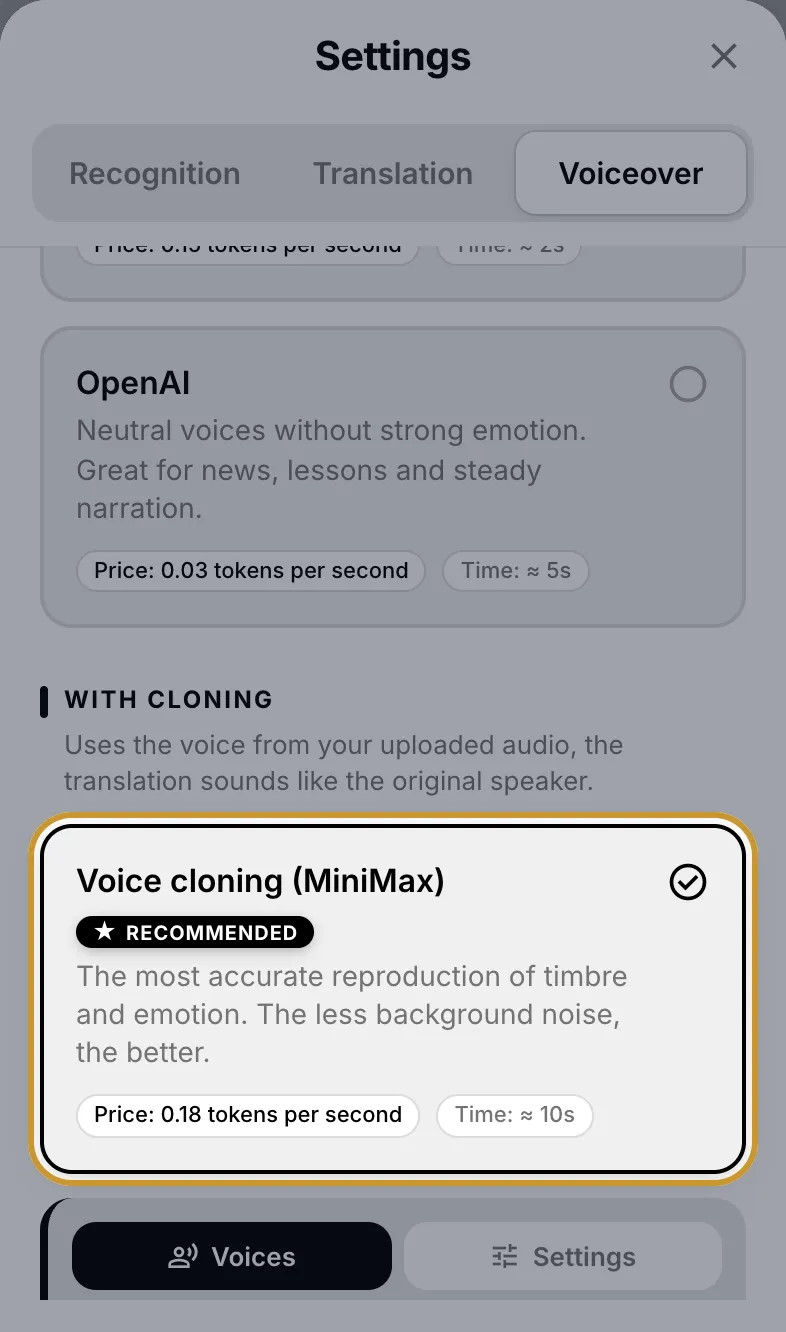
To open the settings, tap the settings icon (sliders) in the top right corner of Translate Audio. The sheet has three tabs: Recognition, Translation and Voiceover. The app remembers your choices for the next recordings.
When a change takes effect
Each tab applies at a different moment, so a change doesn't always affect the result already on the screen.
| Tab | Applies to |
|---|---|
| Recognition | the next file you choose |
| Translation | repeat translations only: when you switch the target language or edit the source text. The first translation of a new file always uses Gemini 3.8 Flash |
| Voiceover | the next time you tap play |
Recognition: who turns speech into text
ElevenLabs Scribe is the default and the cheapest option. The language of the recording is always detected automatically.
| Option | What the app says about it | Time | Price |
|---|---|---|---|
| ElevenLabs Scribe | accurate with accents and background noise, 99 languages | ≈ 3 s | about 0.7 tokens per minute |
| OpenAI Transcribe | better with technical terms and proper nouns | ≈ 5 s | about 1.2 tokens per minute |
| OpenAI Whisper | an option for long recordings | ≈ 10 s | about 1.2 tokens per minute |
The provider chosen here is also used by Text Transcription, which has no settings of its own.
Translation: which model translates
The model costs fractions of a token per 1,000 characters, so the choice is about quality and speed.
| Model | Good for |
|---|---|
| Gemini 3.8 Flash (default) | the best quality, handles slang, idioms and complex text |
| Gemini Flash Lite | the fastest, but can be less accurate with slang and emotional speech |
| GPT 6 Luna | a cheap alternative for most texts |
Voiceover without cloning
Standard voices read the translation quickly and cheaply, but they don't sound like the speaker. In Translate Audio each of them has one fixed voice that you can't change.
| Option | Character | Time | Price |
|---|---|---|---|
| ElevenLabs | the most lifelike intonation of the stock voices | ≈ 2 s | 10 tokens per 1,000 characters, at least 1 token |
| OpenAI | neutral voice without strong emotion, for news and lessons | ≈ 5 s | 1.8 tokens for every started 150 words |
Voiceover with cloning
Cloning options voice the translation with the voice from your recording. MiniMax and Qwen 3 take the voice from the first 60 seconds of the file, so those seconds should contain clear speech of one person.
| Option | Min. recording | Languages | Time | Price |
|---|---|---|---|---|
| MiniMax (marked recommended) | 10 s | 38 | ≈ 10 s | 180 tokens for cloning plus 12 tokens per 1,000 characters |
| Qwen 3 | 3 s | 10: English, Russian, Chinese, German, French, Spanish, Italian, Japanese, Korean, Portuguese | ≈ 20 s | about 20 tokens per 1,000 characters, at least 5; with a saved voice about 11 |
| ElevenLabs Dubbing v2 | none, up to 2.5 hours | 94 | ≈ audio length | 4.4 tokens per second of the recording |
MiniMax options
Clone from file: a one-time clone for this translation. My MiniMax voice: one of your saved voices, without the 180-token cloning fee.
Speed: from 0.5x to 2.0x. A higher value means faster speech.
Emotion: Auto (recommended), Happy, Sad, Angry, Fearful, Surprised, Calm or Disgusted.
The translation must be up to 10,000 characters.
If you change speed or emotion and voice the same result again, the 180 tokens are not charged a second time.
Qwen 3 options
Clone from file or My Qwen voice.
Speech style: Auto, Slow, Fast, Calm, Energetic, Professional, Friendly or Soft. It works only with Clone from file.
If Qwen cloning fails, the app voices the translation with a standard voice and shows «Voice cloning is unavailable right now. A standard voice was used.»
ElevenLabs Dubbing v2
Dubbing v2 dubs the original recording itself and doesn't read the text from the Translation tab. It keeps the pace and timbre of the voice and voices each speaker separately. Because of that, your edits to the translation are not used: «Dubbing uses the original recording, so edited text is not applied.» Saved voices don't work with Dubbing v2.
What happens if you don't choose a voice
Until you pick a voiceover option in this sheet, the app chooses one when you tap play.
For the 10 Qwen 3 languages and recordings from 3 seconds, the voice is cloned with Qwen 3 without asking.
For other languages, the app asks Clone voice? with the price of the cheaper option, MiniMax or Dubbing v2. Use AI voice means a standard voice. With Don't ask again the answer is remembered.
Any option you tap in the sheet is kept for the next files, as long as it suits their language and length.
An option that doesn't suit the current recording is greyed out with a hint such as «language not supported» or «needs ≥ 10 sec of audio». If you switch to a language your chosen option doesn't support, the app switches the voiceover to ElevenLabs.
Saved voices
A saved voice lets you voice translations with your own voice even when someone else is speaking in the recording. There are two ways to get one.
After a voiceover with Clone from file, tap Save voice in the What next? block. A MiniMax voice saved this way won't charge 180 tokens next time.
Add a voice in Settings → My Voices. See How to record or upload a voice sample.
If the voiceover sounds wrong, the symptoms and fixes are in Why the translated voice sounds robotic. Errors are covered in Translate Audio voiceover failed or is stuck.
Contact support
Describe the problem and we will reply by email. Add the file name or job ID if you have one.