VocaLingo or Otter: transcribing and translating recordings
Otter records meetings and writes notes on a subscription. VocaLingo also translates recordings into 111 languages in the speaker's voice and is paid per use.
Updated November 22, 20264 min read
Otter is built around meetings: its assistant joins Zoom, Google Meet and Teams calls, records them and writes notes. VocaLingo works with any recording you already have, a lecture, an interview, a voice message or a YouTube video, and does more with it than a transcript. The facts about Otter below were checked against its App Store page and website on 22 November 2026.
What each app can do
Both apps turn speech into text with a summary. Translation, voice and video tools are only in VocaLingo, and automatic meeting recording is only in Otter.
| Task | VocaLingo | Otter |
|---|---|---|
Transcribe a recorded file | Yes: Text Transcription and Video to Text, a file up to 100 MB or a link up to 2 GB | Yes, while recording and from imported files. The free plan allows 3 imports in total |
Summary of the recording | Yes: the Essence tab with Brief, Key points and Chapters, and a PDF | Yes: summary and action items |
Ask questions about the recording | Yes, Discuss in chat with the AI model you pick | Yes, Otter AI Chat |
Transcribe a YouTube, TikTok or Instagram video by its link | Yes, paste the link in Video to Text | Not described on the pages we checked |
Join a Zoom, Meet or Teams call and record it | No | Yes |
Speech languages | The language is detected automatically; translation into 111 languages | The App Store page lists English, Spanish, French and Japanese |
Translate the recording and voice it in the speaker's voice | Yes, Audio Translation | No |
Choose the speech recognition model | Yes: ElevenLabs Scribe, OpenAI Transcribe or OpenAI Whisper | No |
Connect to Claude or ChatGPT through MCP | Yes, 15 tools that run jobs: transcribe, translate, summarize, voice a text, dub a video | Yes, read-only: the assistant can search and read your Otter notes |
Where it works | iPhone, iPad, Android, Mac with an Apple chip, web | iPhone, iPad, Android, web, desktop apps and a Chrome extension |
What VocaLingo does that Otter doesn't
Otter stops at the transcript and the notes. In VocaLingo the same recording can go further, and all of it is paid from one balance.
Translation in the speaker's own voice. Audio Translation transcribes a recording, translates it into one of 111 languages and voices the translation with a clone of the speaker's voice. See how Audio Translation works.
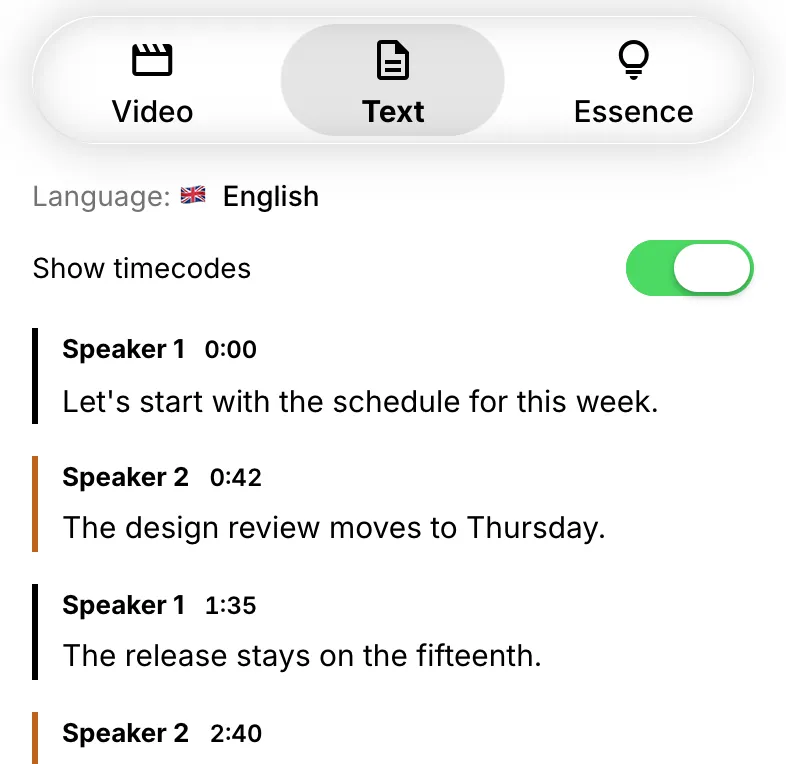
Videos by link. Paste a YouTube, TikTok or Instagram link into Video to Text and get the transcript by speaker, the Essence tab and a PDF without downloading the video yourself.
Your choice of model. In the recognition settings you pick ElevenLabs Scribe, OpenAI Transcribe or Whisper. In the AI chat you pick from GPT, Claude, Gemini, Grok, DeepSeek and MiniMax, or leave it on Auto. The chat also searches the web, reads files up to 50 MB, writes and runs code and draws pictures.
An MCP server that does the work. Connected to Claude, ChatGPT or Cursor, VocaLingo takes a recording from the assistant and returns the transcript, a translation or a voiceover. Otter's MCP server reads notes that are already in Otter. See how to connect VocaLingo to AI agents.
When Otter is the better choice
Pick Otter if you have meetings every day and want notes without starting anything: its assistant joins calls on its own, records them and shares notes with your team. If you transcribe more than 20 hours a month, Otter Pro's fixed price also comes out cheaper per hour than buying tokens.
How the prices compare
VocaLingo sells tokens that you pay for once. Otter sells monthly or yearly plans with a set number of minutes.
| VocaLingo | Otter | |
|---|---|---|
Try for free | 3 free tries of each tool on vocalingo.app/tools; 50 tokens with the promo code UMAKHAN | Basic plan: 300 minutes a month and 3 file imports in total |
Smallest payment | $2.99 once for 100 tokens. They don't expire | Pro: $16.99 a month or $99.99 a year |
One hour of transcription | About 44 tokens with ElevenLabs Scribe, about $1.32 from the smallest pack | Counted against the plan's minutes |
Subscription | Optional. Premium is $19.99 a month in the US stores or $14.99 on the website and includes 1,000 tokens | Needed once the free limits run out |
How to try VocaLingo without paying
You don't need a card or a subscription to try VocaLingo.
Enter the promo code UMAKHAN in Settings, then Free Tokens, then Have a promo code? and get 50 tokens. It works for an account with email, Google or Apple during the first 30 days after sign-up. That is more than an hour of transcription.
On vocalingo.app/tools each tool gives 3 free tries before the first purchase, with no sign-up.
Post a video, post or article about VocaLingo and send the link in the Tell about VocaLingo task. After a check you get 1,000 tokens and 30 days of Premium, and the task can be repeated once a month.
All the ways in one place: what is free in VocaLingo.
Sources: Otter in the App Store, Otter pricing.
Try it in the app
Translate voice messages in the speaker's own voice. Turn video and audio into text and summaries. You can start for free.


Contact support
Describe the problem and we will reply by email. Add the file name or job ID if you have one.